Your D81 tables, filled in from one list.
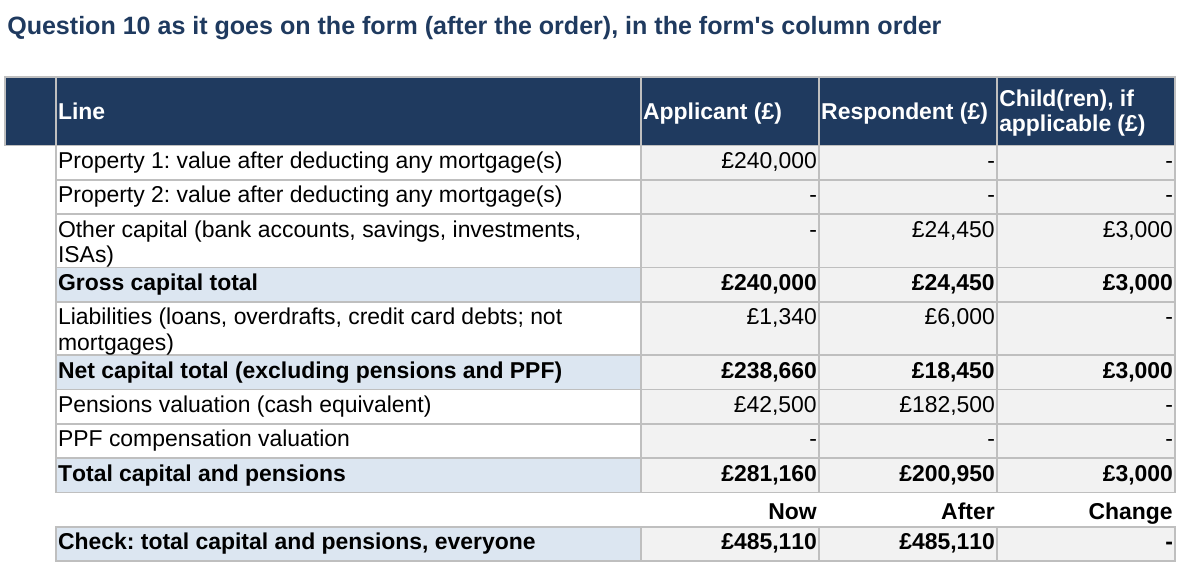
List what each of you owns and owes once, and who has it after the order. The workbook builds questions 8 to 11 of the D81 in the form's own column order, and checks the totals add up.
- Follows D81 04.25, the current version
- Joint items split by share, pension sharing by £ or %
- Private: nothing uploaded, no account, and your card statement says DESK WORKBOOKS. How we keep it private
Not legal advice, and it doesn't write your consent order. See a worked example
Look inside before you buy
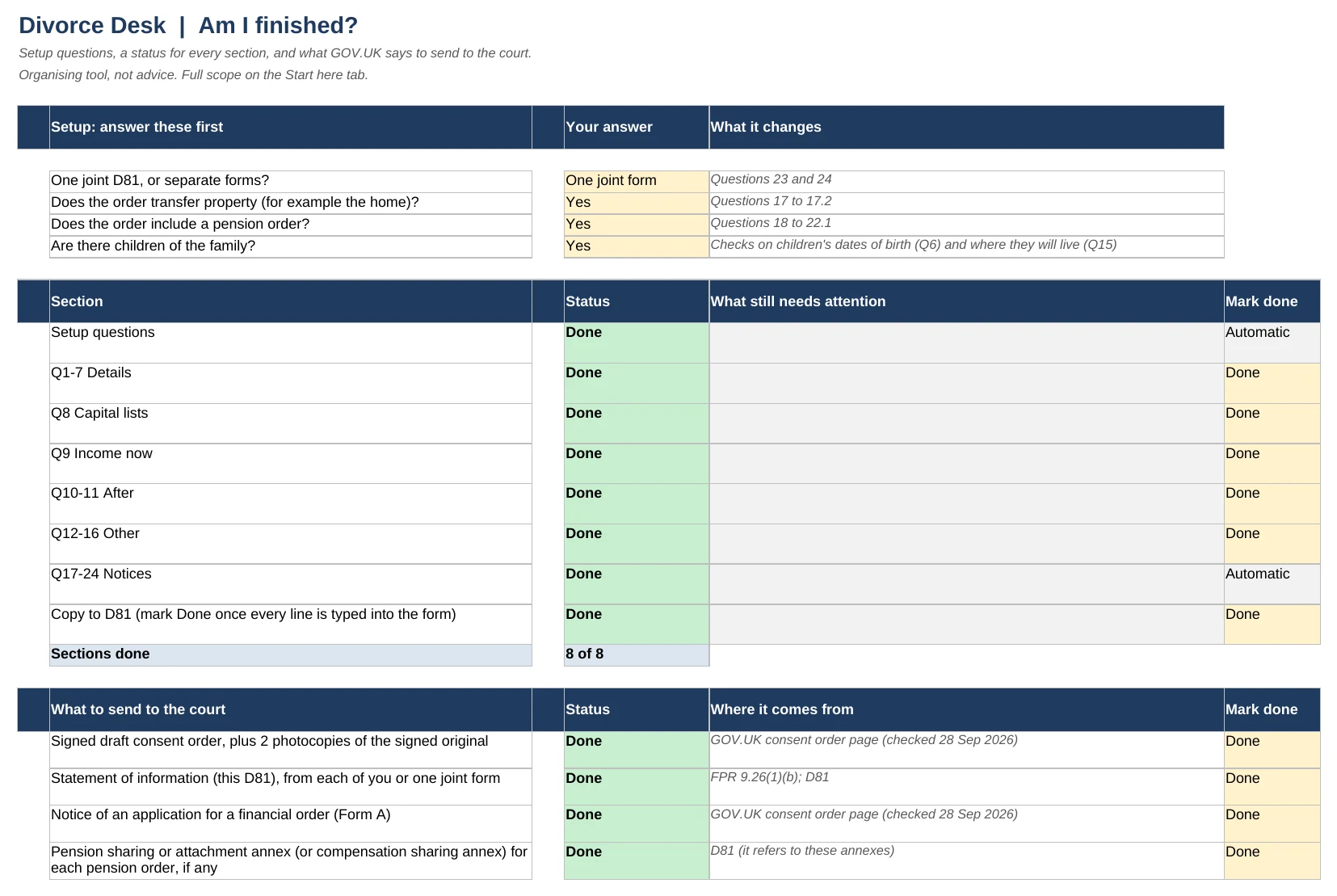
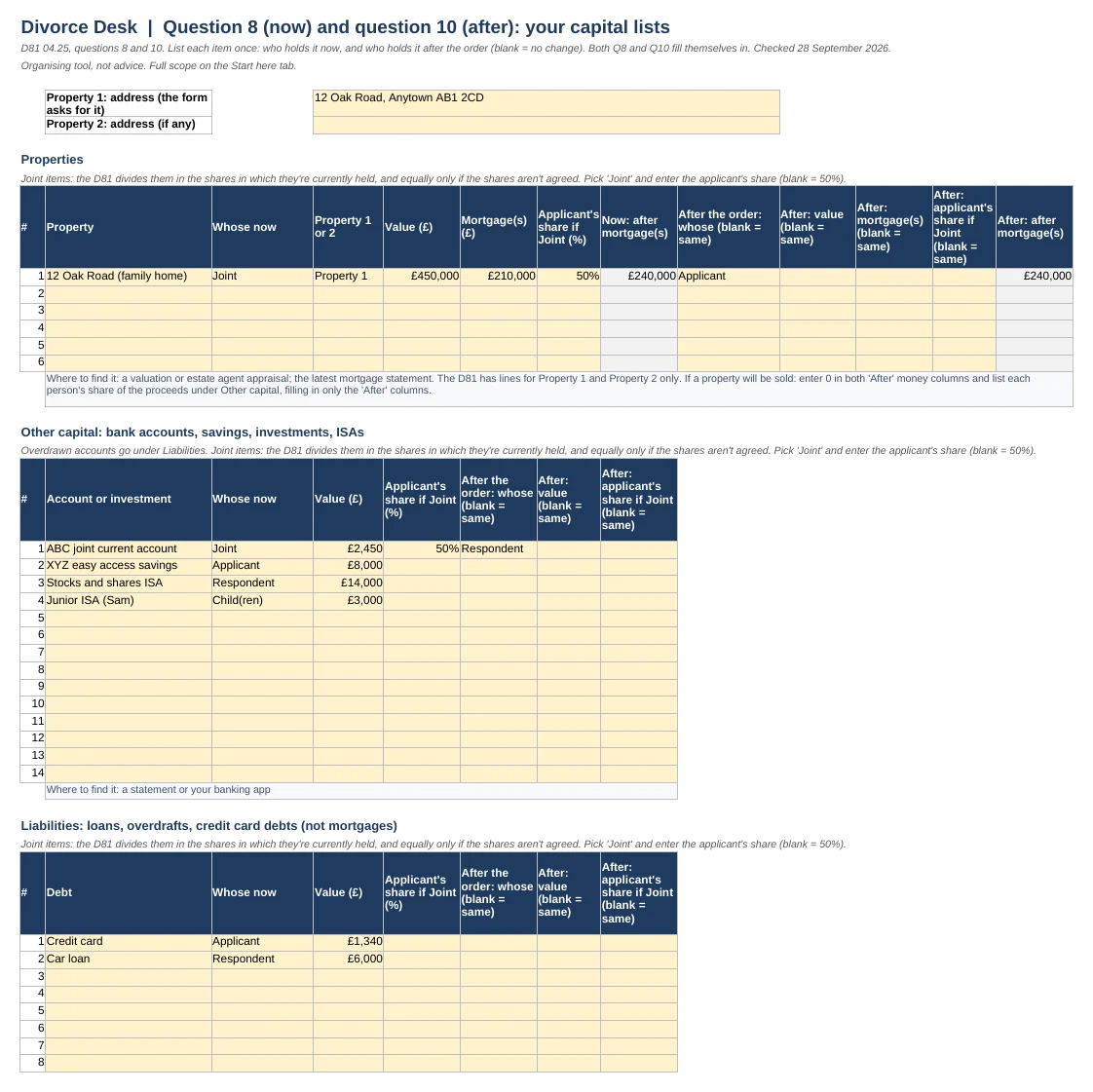
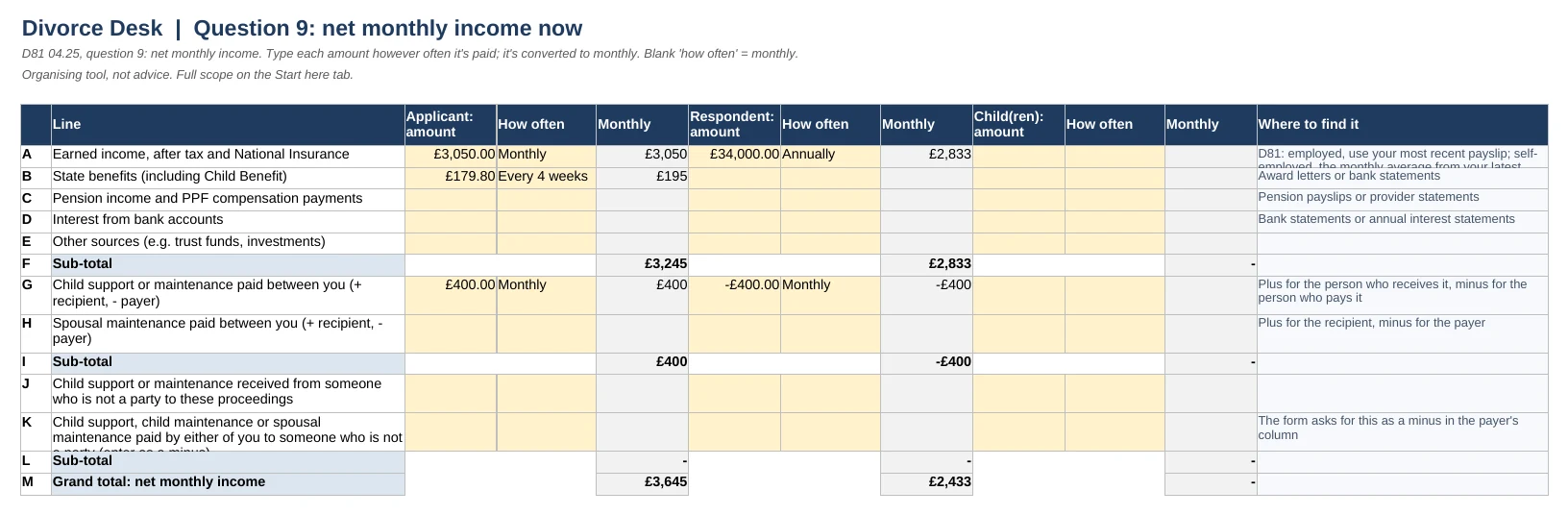
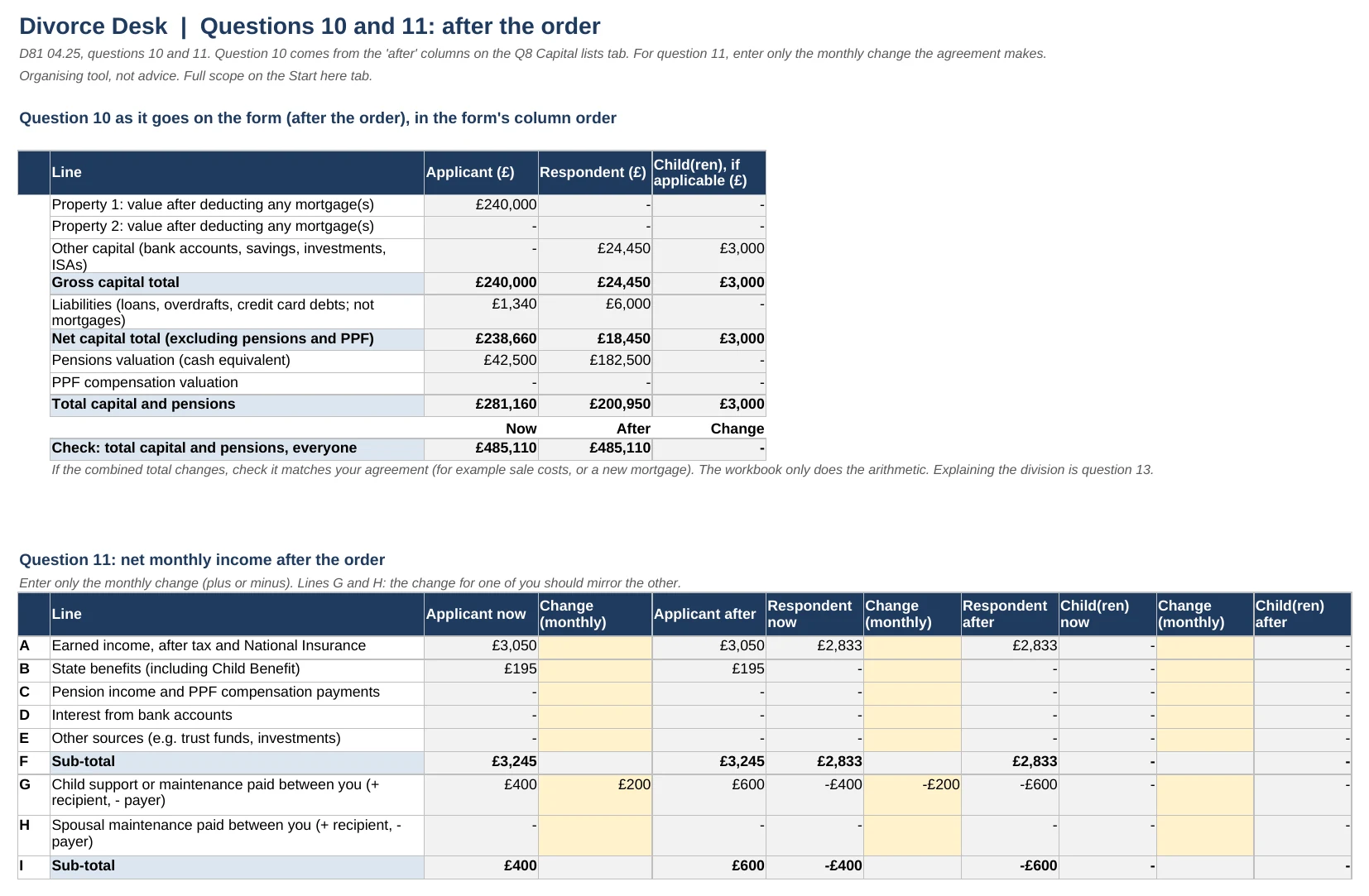
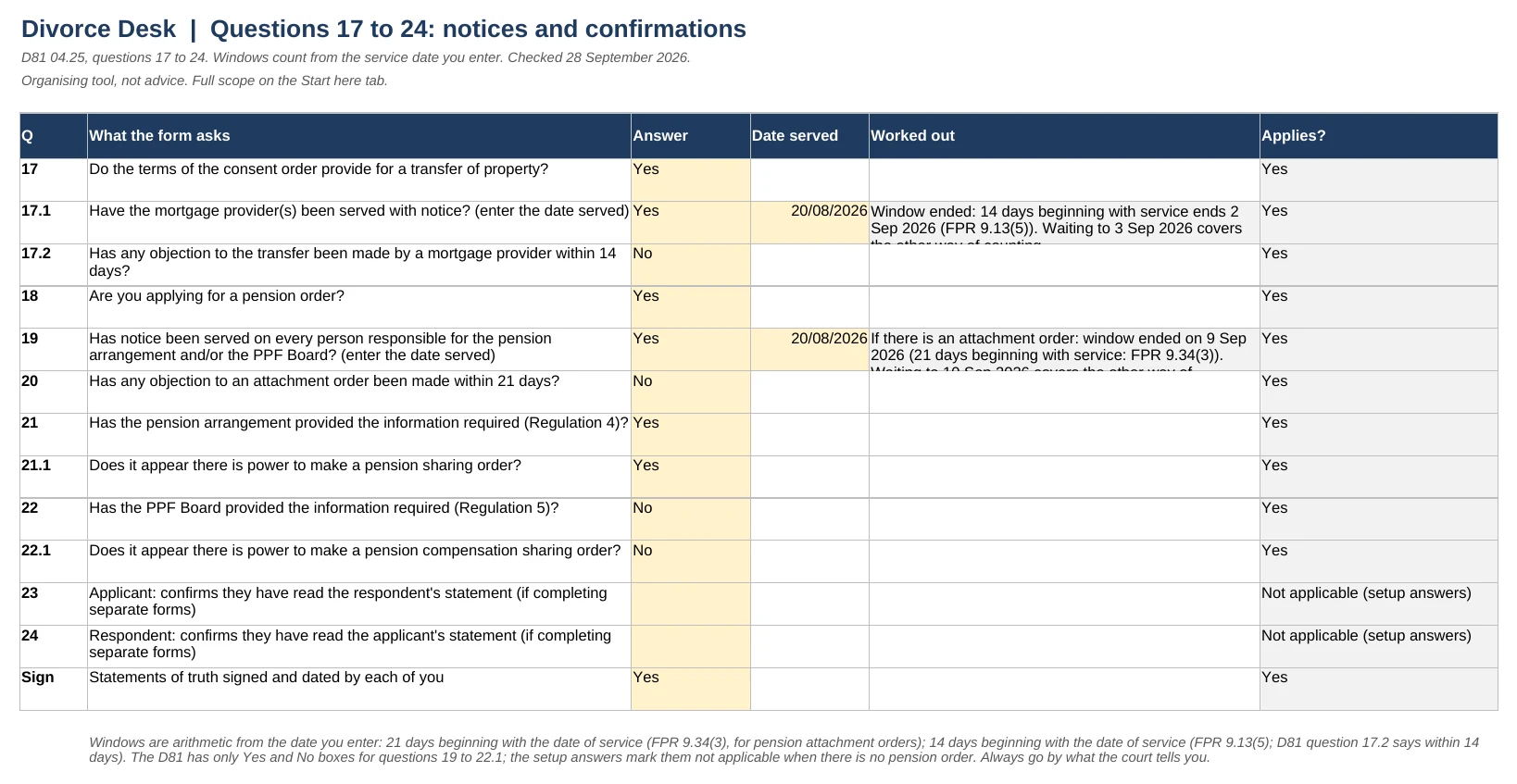
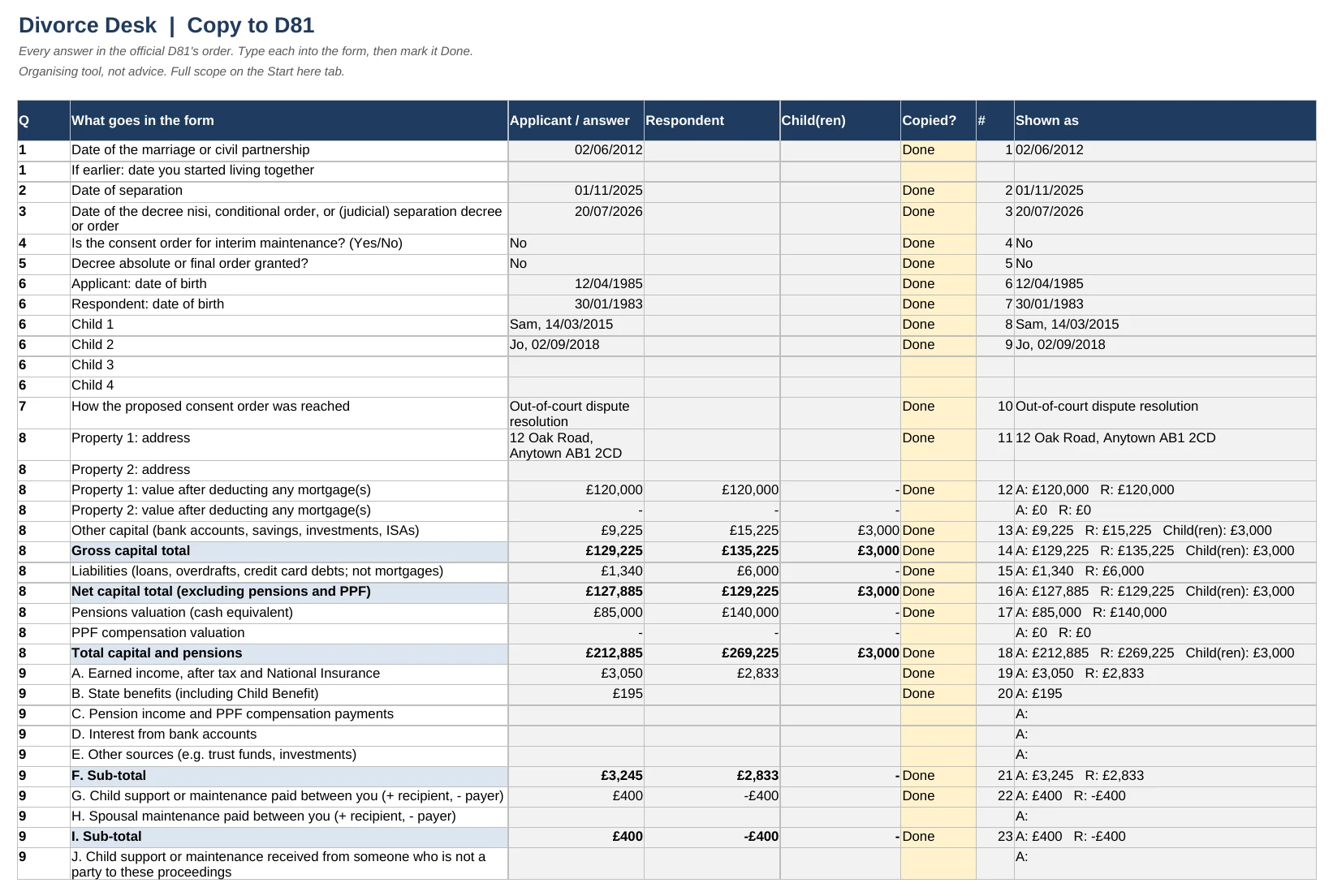
Every main tab of the filled-in example that comes with it, exactly as you'll get it. Tap any one to see it full size.
Private by design
Divorce paperwork is sensitive, and the other person may share your computer, your bank account or your inbox. So everything here is built to stay out of sight.
Nothing comes to us
It's a file you download and fill in yourself. No account, no login, no upload. We never see your figures.
Works offline
Once it's downloaded, it works in Excel with no internet connection. No macros and no data connections: nothing in the file sends your data anywhere.
A discreet card statement
Your bank statement shows DESK WORKBOOKS. The word divorce never appears.
Discreet emails and files
Emails come from Desk Workbooks, and no subject line or preview mentions divorce or the forms. Nor do the download file names or the file details.
Lock it with a password
Excel lets you set a password that's needed to open the file, so it stays yours on a shared computer. Microsoft's guide
You stay in control
No tracking cookies unless you say yes. Unsubscribe from emails in one click, and ask us to delete your details at any time.
The D81 is short. Its tables are where people get stuck.
tables, now and after
Capital and income for each of you, before and after the order, in the form's column order: applicant, respondent, children.
list, not four
Enter each property, account, debt and pension once, with who holds it after. The tables fill themselves in.
check line
It compares everyone's combined capital before and after the order, so an item left out or counted twice shows up straight away.
What the D81 Organiser does
Questions 8 and 10 done for you
Properties after mortgages, other capital, liabilities, pensions and PPF compensation, now and after the order, in the form's rows and columns.
Joint items handled
Joint items are divided in the shares they're held in, as the D81 asks. Leave a share blank and it's split equally.
Pension sharing
Enter the amount or percentage transferred and it moves from one of you to the other in question 10.
Questions 9 and 11
Type income however often it's paid; it's converted to monthly, as the form asks. For question 11, enter only what changes.
Notice dates worked out
Enter when you served the mortgage lender or pension scheme and see when the objection window ends.
What to send, from GOV.UK
The GOV.UK checklist of what goes to court, the fee and the address, plus any pension sharing or attachment annex the D81 says to attach. Last checked 28 September 2026.
Why not just do it in Excel yourself?
You could. The Organiser is that spreadsheet already built and checked against D81 04.25, with the parts people get wrong handled for you:
- joint items split in the shares they're held, now and after
- a pension share moved from one of you to the other, by amount or percentage
- lump sums, sales and buyouts recorded once and carried into question 10
- income converted to monthly from any frequency, with lines G and H checked against each other
- the before-and-after check line, notice dates, and every answer listed in the form's order to copy across
If you'd rather build your own, the D81 guide and worked example are free.
What you get
- The D81 Organiser: questions 1 to 24 of D81 04.25, with the tables built for you
- A filled-in example of a made-up couple: a home transferred, a pension share and a lump sum
- Copy to D81 and a print view: every answer in the form's order
- The GOV.UK sending checklist, the fee and the address, including any pension annex the D81 says to attach if appropriate
- Secure payment by Stripe
- Instant download
- Card statement: DESK WORKBOOKS
- Fault? We fix it or refund you
- UK company, registered in England and Wales
What it doesn't do
It doesn't draft your consent order, decide what's fair, or write your answers to questions 12 to 14. It doesn't fill in the PDF: you type each answer from the Copy to D81 tab.
Checked against the source
Checked on 28 September 2026 against form D81 04.25 (GOV.UK), the GOV.UK consent order page and the Family Procedure Rules, Part 9.
Questions
Is this legal advice?
No. It does the arithmetic for the tables on the D81 from your own figures and follows the form's wording. It doesn't tell you what to agree, whether a settlement is fair, or what to write in questions 12 to 14.
Does it write our consent order?
No. The draft consent order is a legal document and isn't in the workbook. GOV.UK's consent order page explains what to send.
Can we fill in one D81 together?
Yes. The setup asks whether you're filling in one joint form or separate forms, and the questions that only apply to separate forms switch off.
What about pensions?
List each pension once with its cash equivalent (CE). If the order shares a pension, enter the amount transferred, or the percentage from your order, and question 10 moves it from one of you to the other.
What if we don't have a pension cash equivalent yet?
The D81 asks for each pension's cash equivalent. Until you have it, leave the value blank: the Organiser flags the pension as missing a value, so the totals aren't mistaken for complete.
What if the house is being sold, or one of us is buying the other out?
Both are covered. The capital lists have 'after the order' columns for every item, with notes on recording a sale or a bigger mortgage.
A solicitor, mediator or online service is doing our paperwork. Do I need this?
Probably not, if they are completing the D81 for you. The D81 Organiser is for people filling in the D81 themselves, including couples whose order is drafted by someone else but who complete the D81 on their own.
What do I need to open it?
Microsoft Excel (Windows or Mac) or Google Sheets. It uses no macros, and we never see your figures.
Can I get a refund?
Because it's a download you get straight away, you agree at checkout that the usual 14-day cancellation right ends when the download starts. If a file won't open or has a fault, we'll fix it or refund you. See the refund policy.