Your Form E, organised, added up and on time.
An Excel and Google Sheets workbook built on the official Form E. Put each figure in once and it adds up every total and carries it through, works out your deadline, tracks every bank statement and writes the letters you need to send.
- Follows Form E 01.23, the current version, section by section
- Excel or Google Sheets. No macros, nothing to install
- Private: nothing uploaded, no account, and your card statement says DESK WORKBOOKS. How we keep it private
Not legal advice. You type the answers into the official form yourself. See a finished example
Look inside before you buy
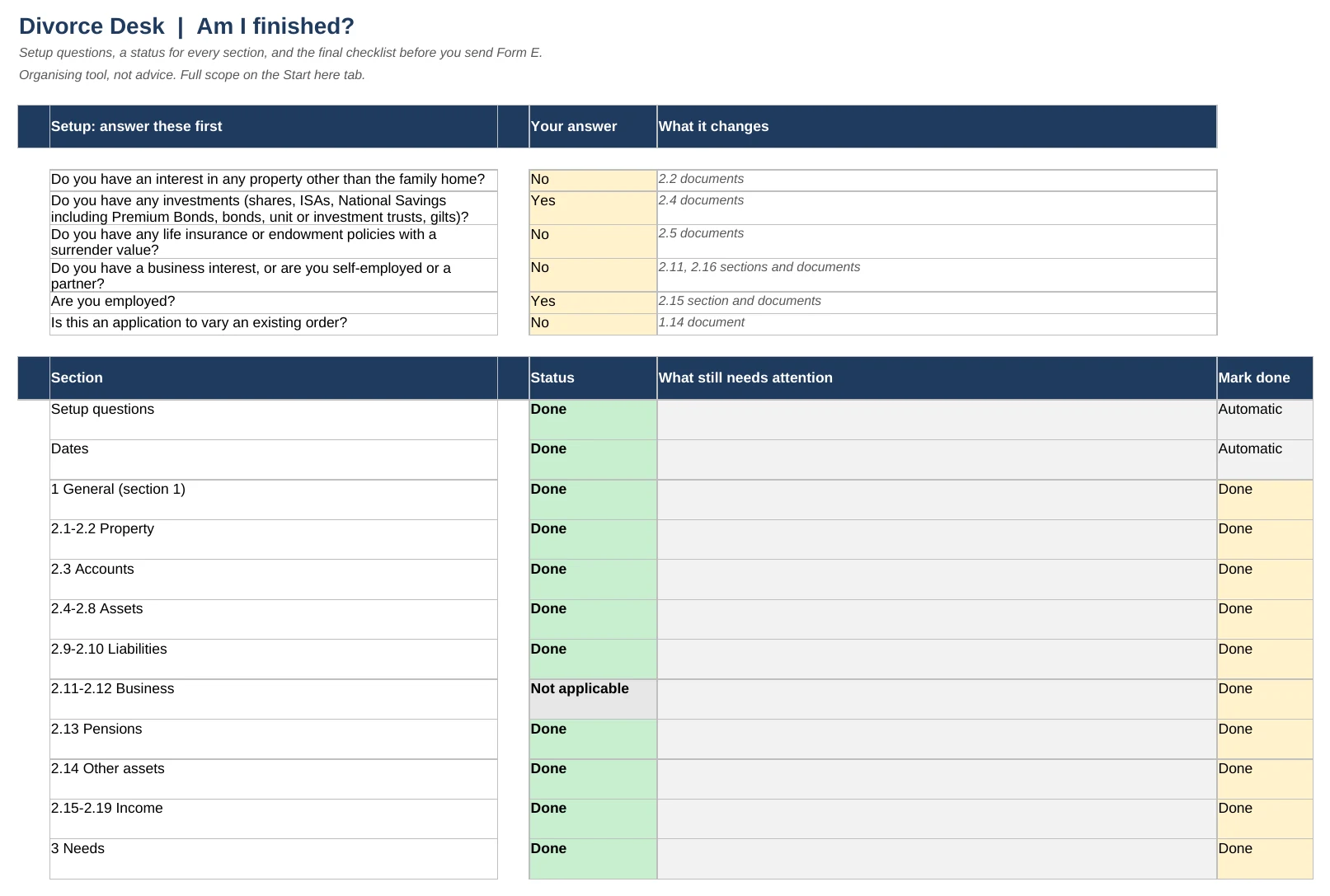
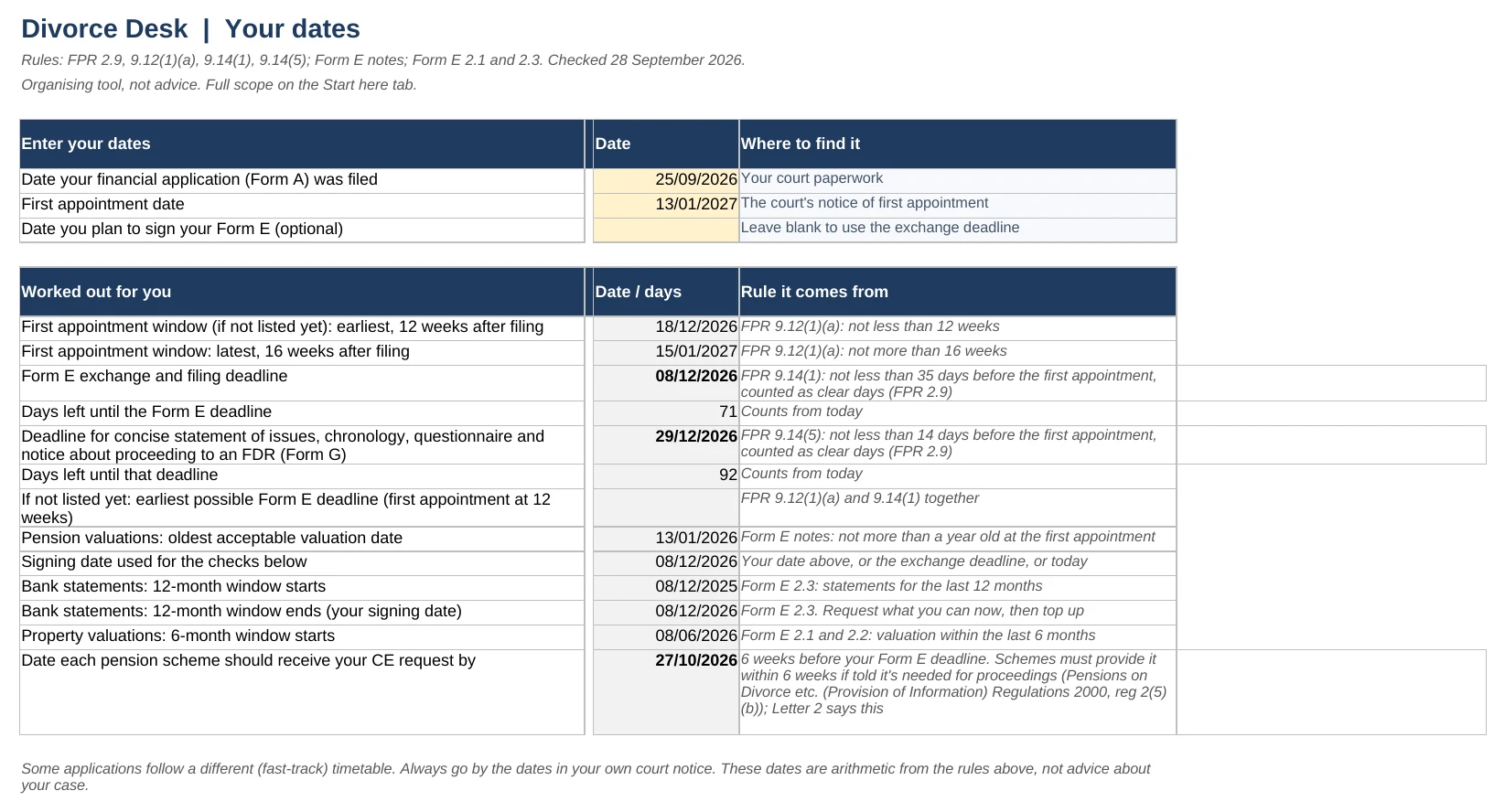
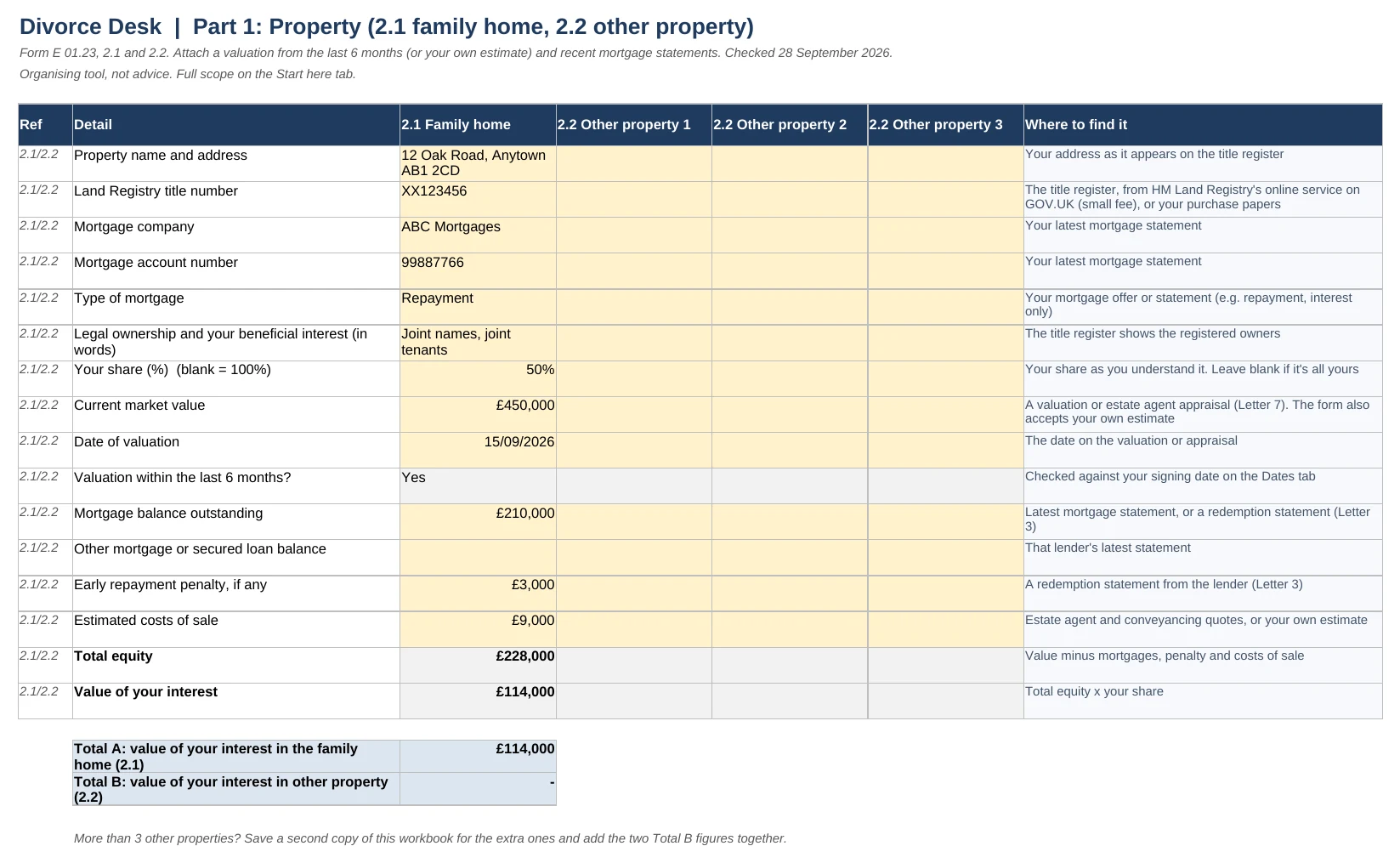
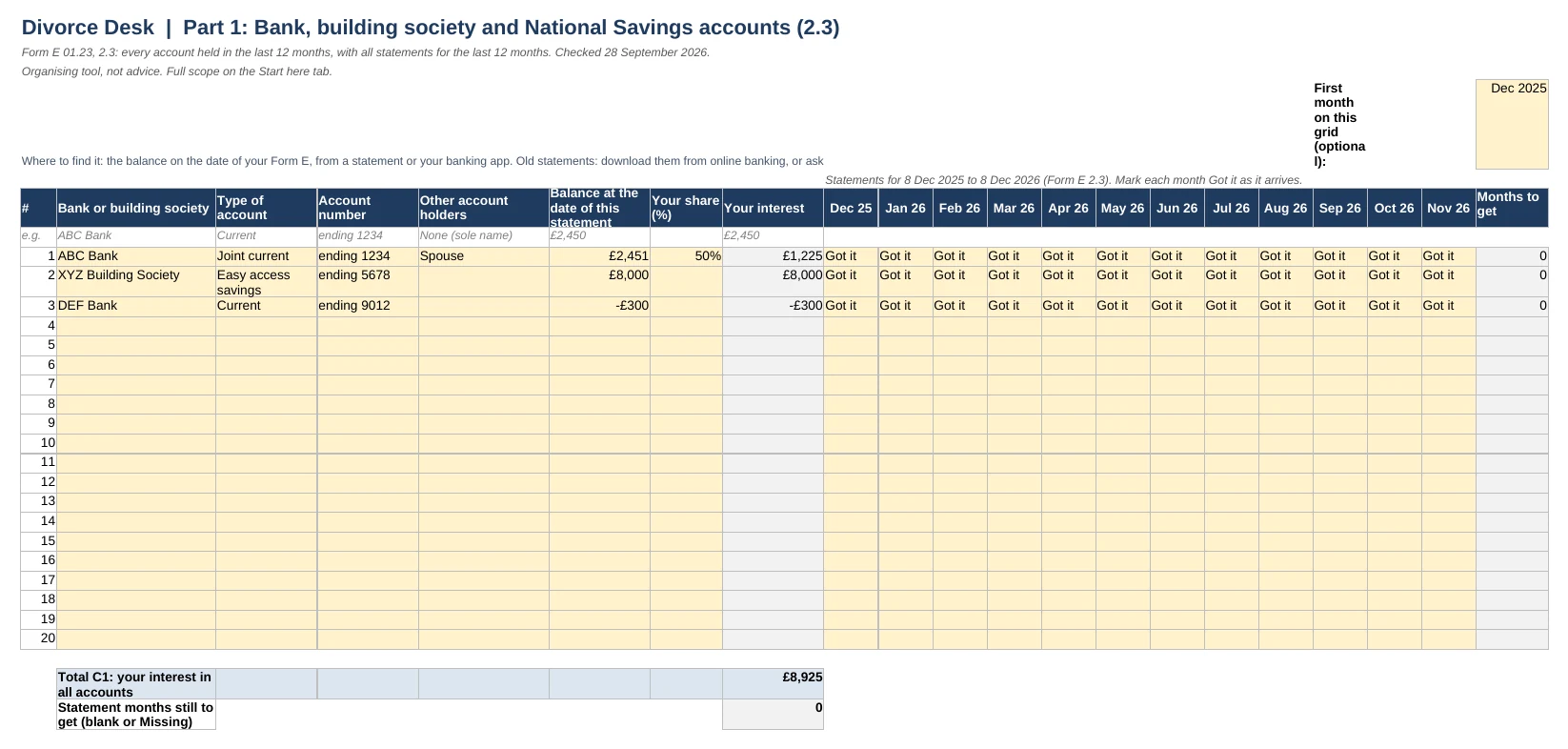
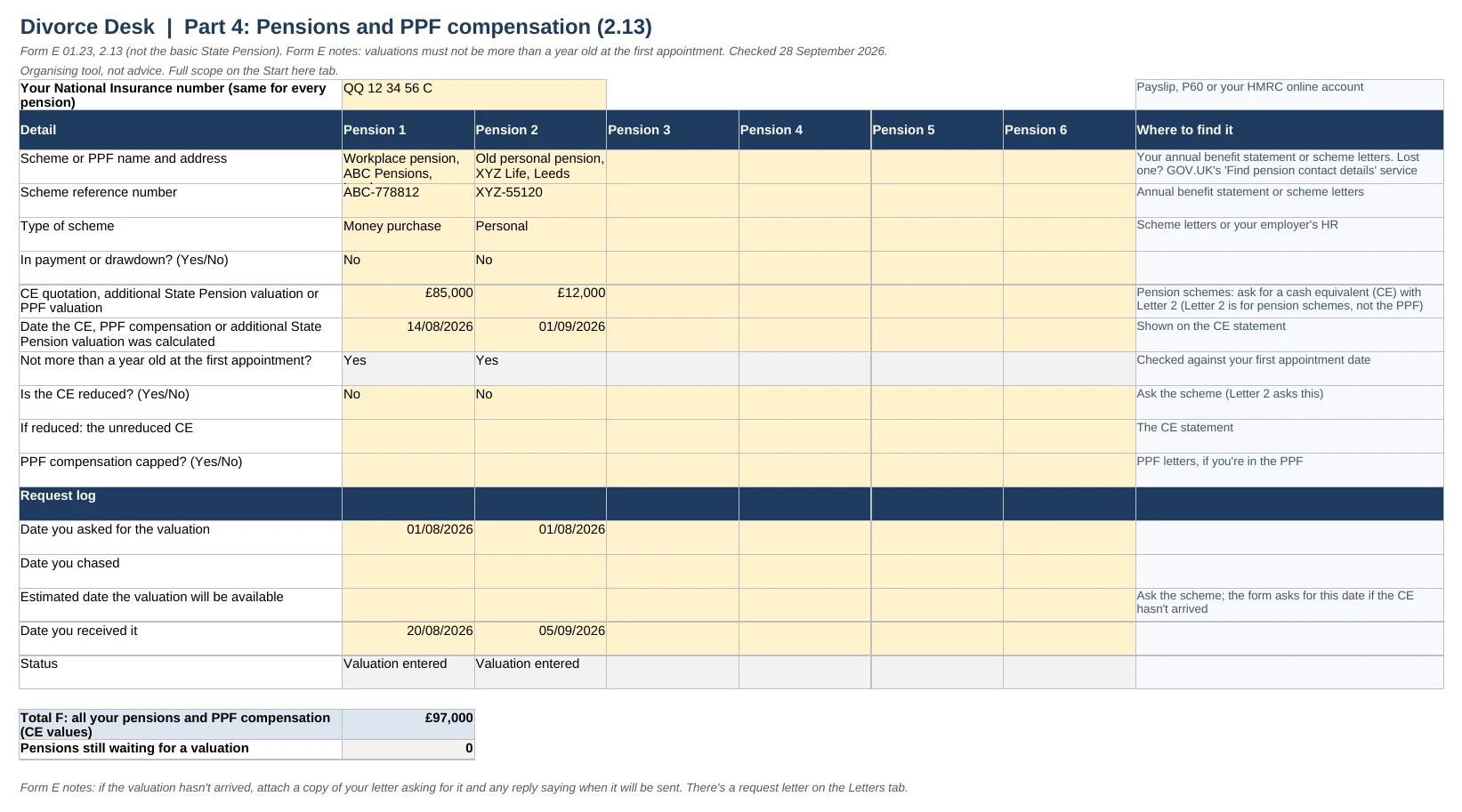
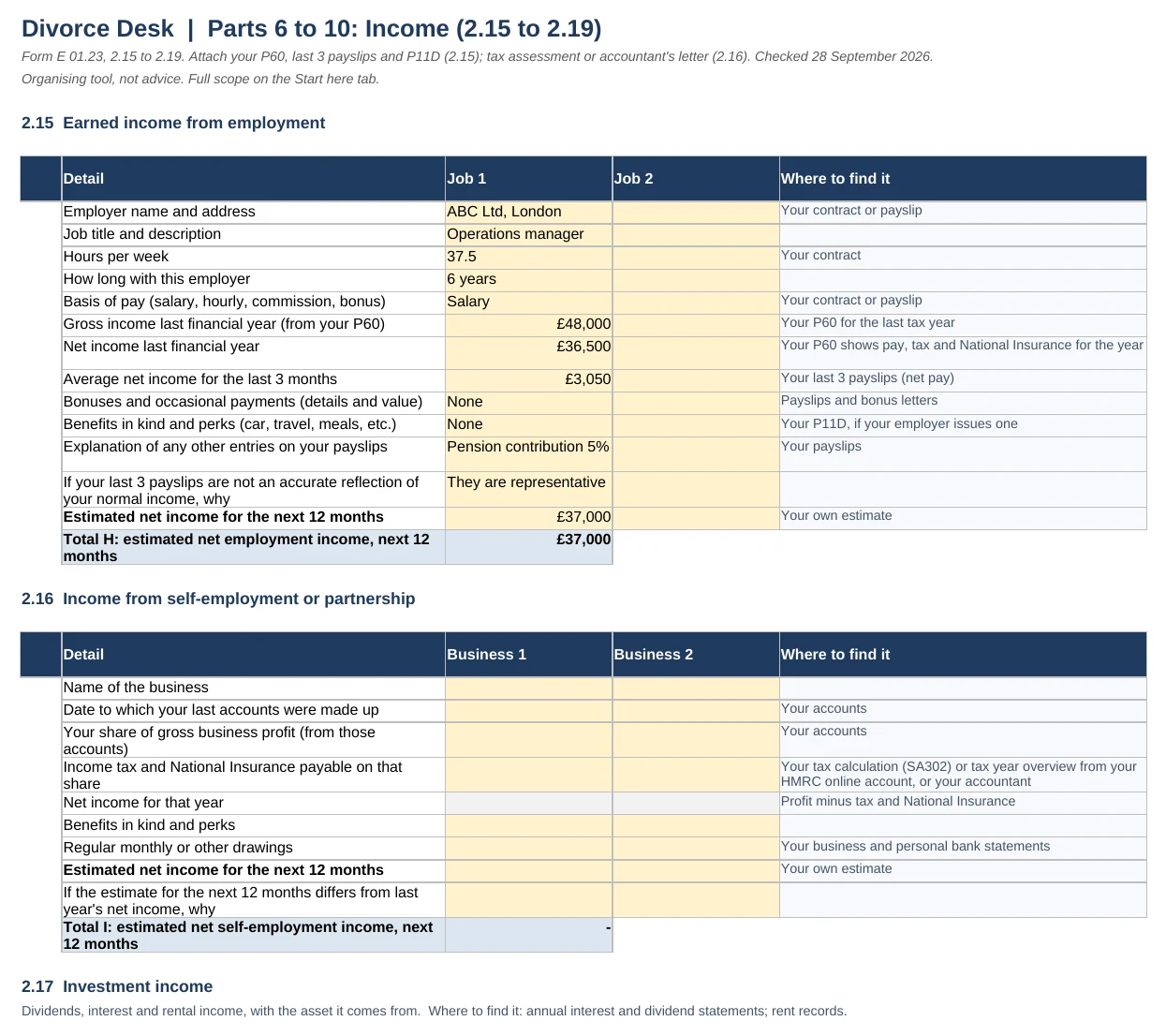
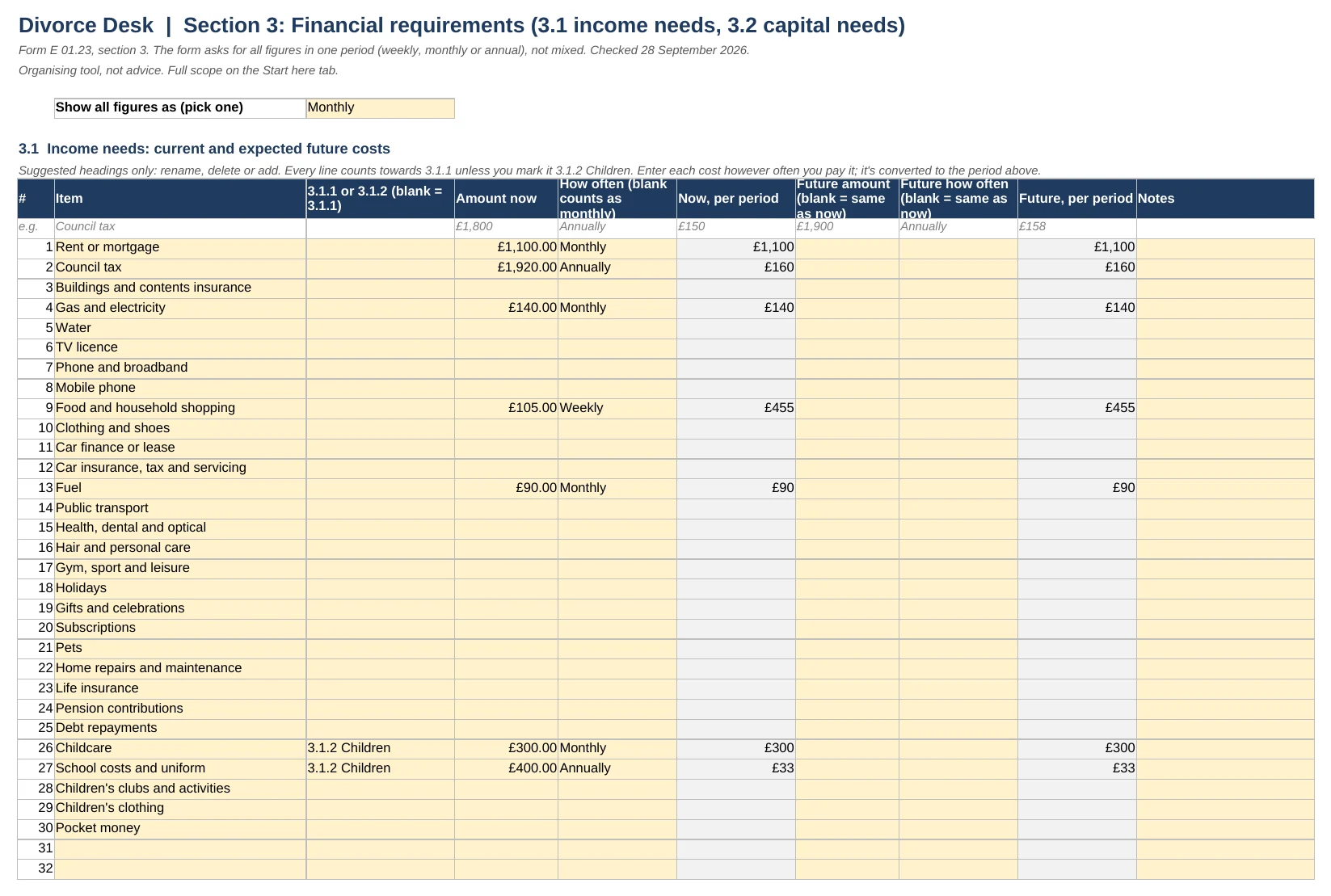
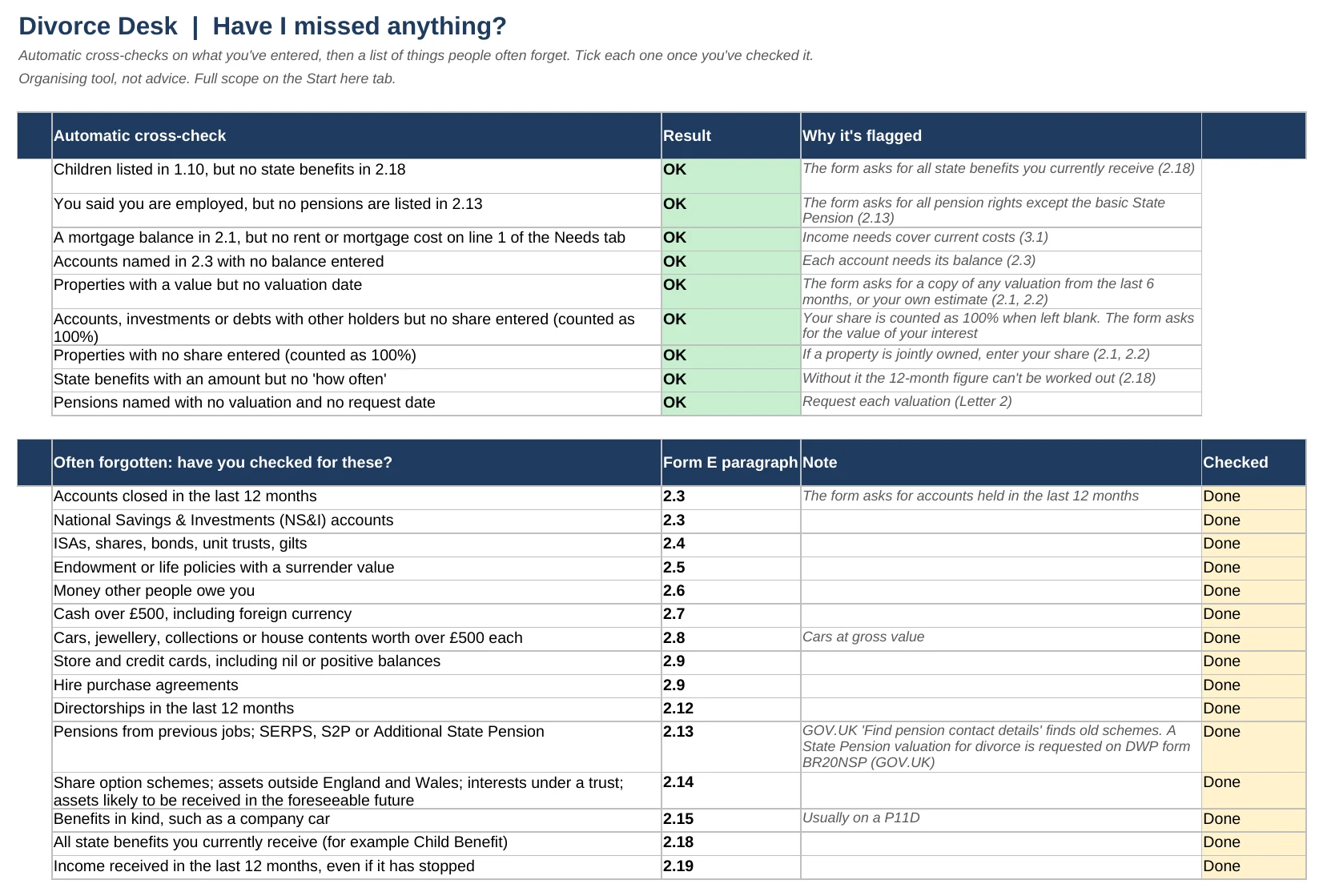
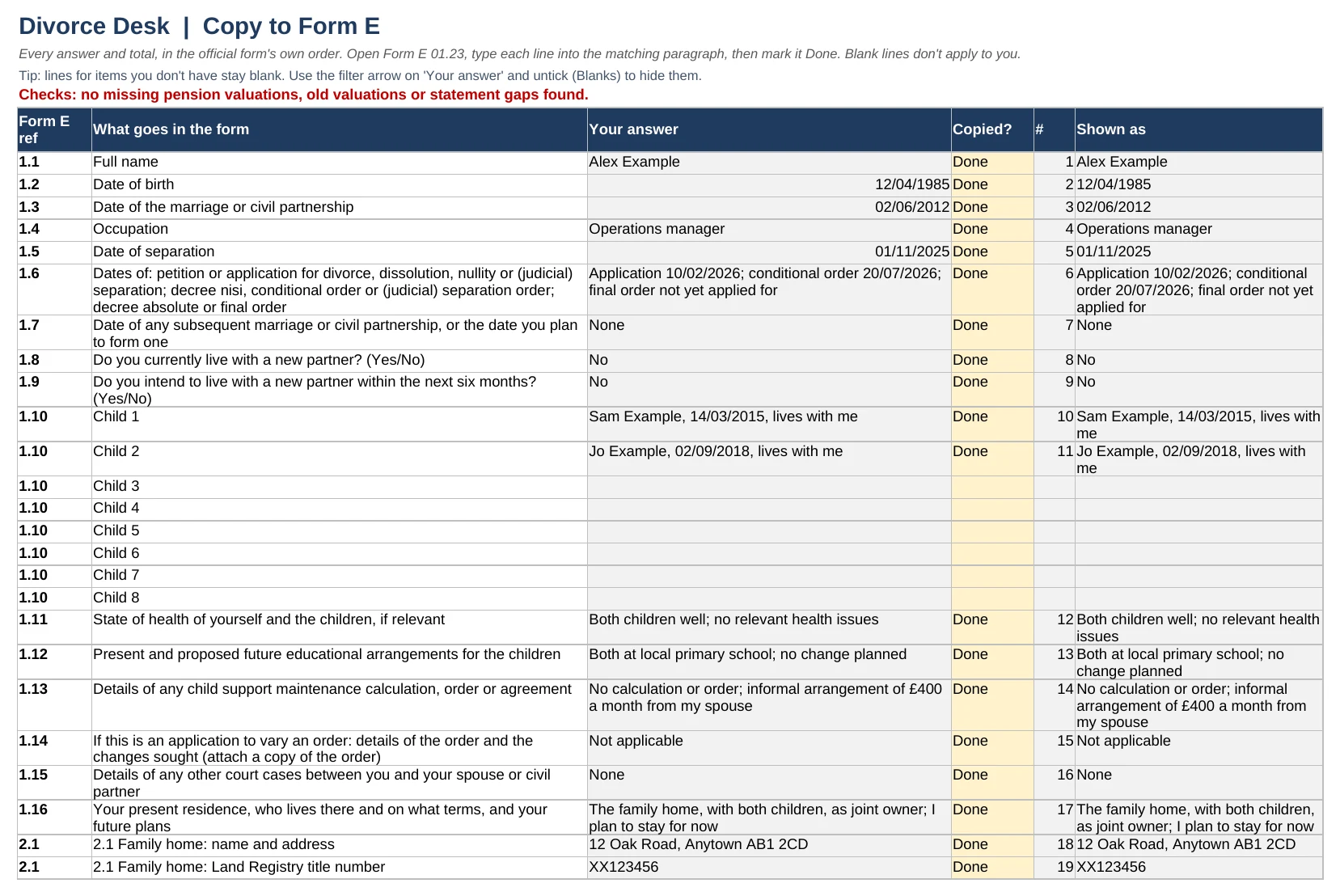
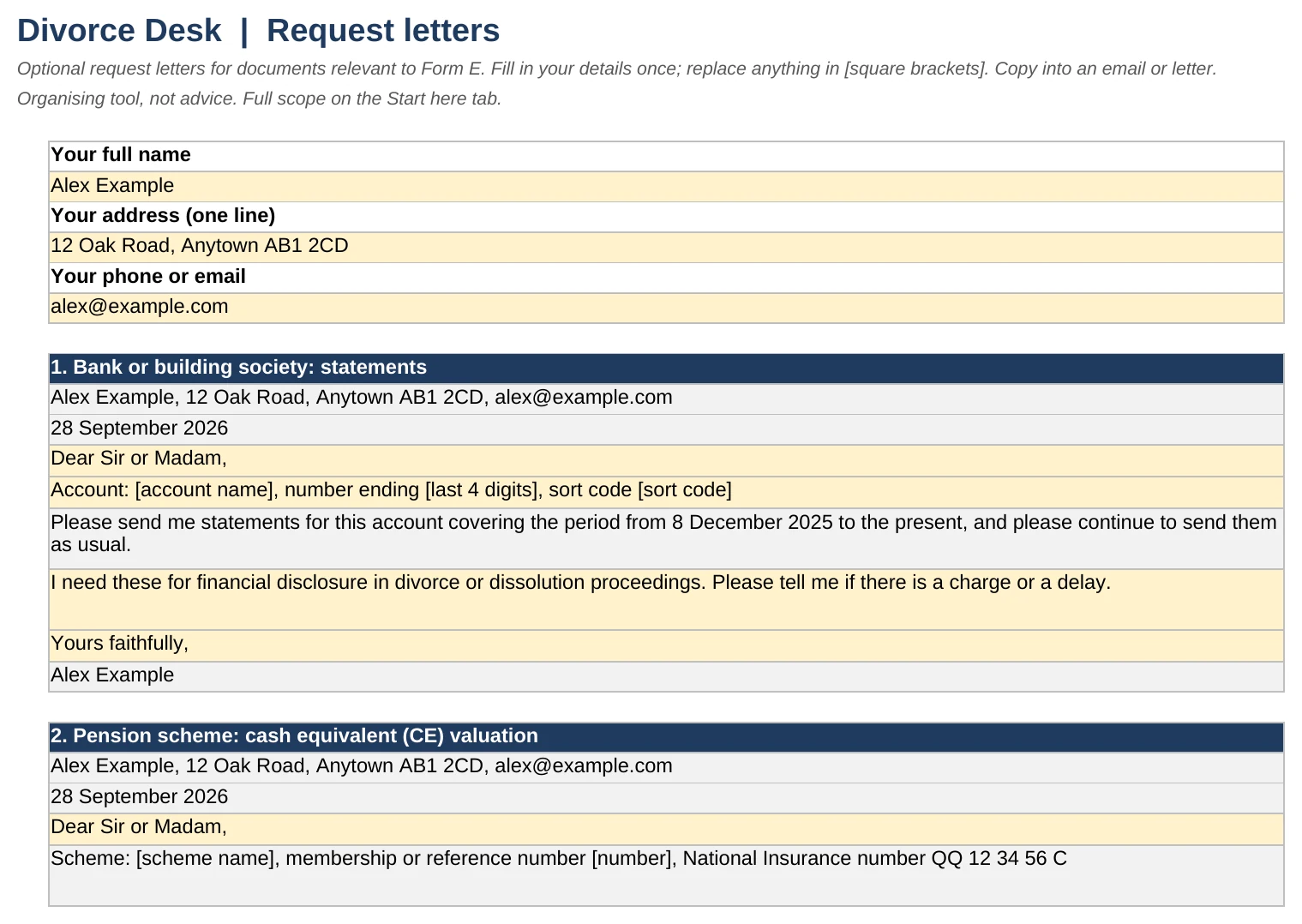
Every tab of the filled-in example that comes with it, exactly as you'll get it. Tap any one to see it full size.
Private by design
Divorce paperwork is sensitive, and the other person may share your computer, your bank account or your inbox. So everything here is built to stay out of sight.
Nothing comes to us
It's a file you download and fill in yourself. No account, no login, no upload. We never see your figures.
Works offline
Once it's downloaded, it works in Excel with no internet connection. No macros and no data connections: nothing in the file sends your data anywhere.
A discreet card statement
Your bank statement shows DESK WORKBOOKS. The word divorce never appears.
Discreet emails and files
Emails come from Desk Workbooks, and no subject line or preview mentions divorce or the forms. Nor do the download file names or the file details.
Lock it with a password
Excel lets you set a password that's needed to open the file, so it stays yours on a shared computer. Microsoft's guide
You stay in control
No tracking cookies unless you say yes. Unsubscribe from emails in one click, and ask us to delete your details at any time.
Form E is hard because of the admin, not just the questions.
pages to fill in
Every account, pension, debt and cost, with totals carried from one section to the next. One wrong sum and the summary is out.
months of statements, every account
Current accounts, savings, cards. Keeping track of which months you have and which you still need is a job in itself.
clear days before your first appointment
That's when Form E has to be exchanged and filed (FPR 9.14(1)). Pension valuations can take weeks, so the real deadline for asking is much earlier.
What the Organiser does for you
Each tab follows a section of the official form, with the form's own numbers and headings.
Works out your deadlines
Enter your first appointment and get your Form E deadline in clear days, the date for your questionnaire and statement of issues, and the latest date a pension scheme should get your request to reply within 6 weeks. Weekends and bank holidays are flagged.
Adds everything up
Totals A to L, gross and net assets and total income (2.20 and 2.21) fill in as you type. Joint accounts count at your share.
Tracks 12 months of statements
A month-by-month grid for every account (2.3), so you can see exactly which statements you still need.
Writes your request letters
Seven letters ready to send. The pension letter says the valuation is needed for financial proceedings on divorce or dissolution, which gives the scheme 6 weeks to provide it once proceedings have started (reg 2(5)(b)).
Tells you what's left
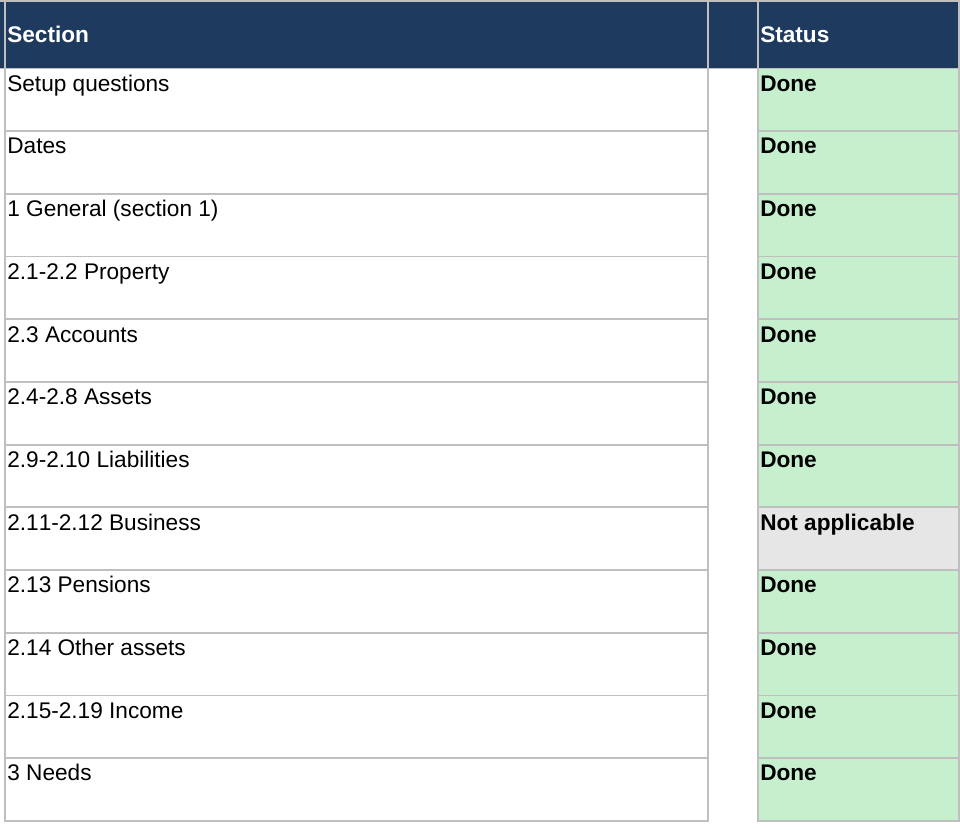
Every section gets a status, and the checks name what still needs attention: a missing share, an old valuation, a statement gap.
Ready to type into the form
Every answer listed in Form E's order, formatted the way the form asks, with a print view to work from.
Why not just use a free guide?
Free guides, like Advicenow's, explain what each section means, and we link to them. They don't do the sums, track which statements you still need, work out your dates or write the letters. That's the admin this workbook takes off you.
This is for people doing Form E themselves, without paying a solicitor to prepare it.
The letter to send tonight
Pension scheme: cash equivalent (CE) valuation
Please provide a cash equivalent (CE) valuation of my pension benefits, showing the date on which it was calculated.
I am notifying you that this information is needed in connection with financial proceedings on divorce or dissolution (regulation 2(5)(b) of the Pensions on Divorce etc. (Provision of Information) Regulations 2000).
Letter 2 of 7, with your name, address, scheme reference and National Insurance number filled in from the workbook.
How it works
Answer six setup questions
Employed? A business? Other property? Sections and documents that don't apply to you drop out.
Fill it in over a few weeks
Send the letters first, then work through the tabs as statements arrive. The status tab shows what's left.
Copy it into the official form
Every answer is listed in Form E's order, with a print view. Type each into the official PDF and tick it off.
What you get
- The Form E Organiser: 21 tabs following Form E 01.23, from section 1 to your needs in section 3
- 7 request letters: bank, pension scheme, mortgage lender, investment provider, life insurer, employer and estate agent
- A filled-in example, so you can see what finished looks like
- A document tracker with each paragraph the form asks you to attach
- A phone tab with your deadline and what's left, for a quick look on the go
- Secure payment by Stripe
- Instant download
- Card statement: DESK WORKBOOKS
- Fault? We fix it or refund you
- UK company, registered in England and Wales
When your ex's Form E arrives, log it and see what's missing: statement gaps, old pension valuations, totals that don't add up. It builds your list of gaps for you.
What it doesn't do
It's an organising tool, not legal advice. It won't tell you what to disclose, what to write in sections 4 and 5, or what a fair settlement is. It doesn't fill in the PDF for you: you type each answer from the Copy to Form E tab.
For what each section means, see our Form E guide and the worked example, or Advicenow's free guide, which the Organiser links to.
Checked against the source
Every rule in the Organiser links to where it comes from. Checked against these on 28 September 2026, and re-checked every quarter:
Questions
Is this legal advice?
No. It organises your own figures and documents and follows the official form. It never tells you what to disclose or what to agree. For help with what each section means, see Advicenow or GOV.UK.
Do I upload my finances anywhere?
Not to us. You fill in the workbook in Excel on your computer, or in your own Google account if you use Google Sheets. We never see your figures.
What do I need to open it?
Microsoft Excel (Windows or Mac) or Google Sheets (File, then Import). It uses no macros. We haven't tested Apple Numbers, so use Excel or Google Sheets.
What happens after I pay?
You get an email straight away with a link to download the workbook (.xlsx), the filled-in example and, if you added it, Their Form E Tracker. Reply to that email if you ever need the link again.
Does it fill in the official PDF?
No. The Copy to Form E tab lists every answer in the form's order, formatted the way the form asks, with a print view. You type each one into the official Form E and tick it off.
I don't have a first appointment date yet.
The Dates tab shows the 12 to 16 week window after your application is filed, and the earliest your Form E could be due, until the court gives you a date. The free deadline calculator does the same.
My ex's Form E has arrived. Does this help?
Their Form E Tracker, £15 when you add it at checkout, logs their statements, pensions and totals against the form and lists the gaps it finds.
What if I've agreed a settlement instead?
Then you're applying for a consent order, and GOV.UK lists form D81 among what to send. See the D81 Organiser.
Can I get a refund?
Because it's a download you get straight away, you agree at checkout that the usual 14-day cancellation right ends when the download starts. If a file won't open or has a fault, we'll fix it or refund you. See the refund policy.
Start with the letters tonight.
Pension valuations and old statements take the longest. The letters are ready as soon as you download.